What Are the Top 10 Finger Scan Door Locks?
FLUID HANDLING EXPERTS

Blog, all our news

What Are the Top 10 Finger Scan Door Locks?

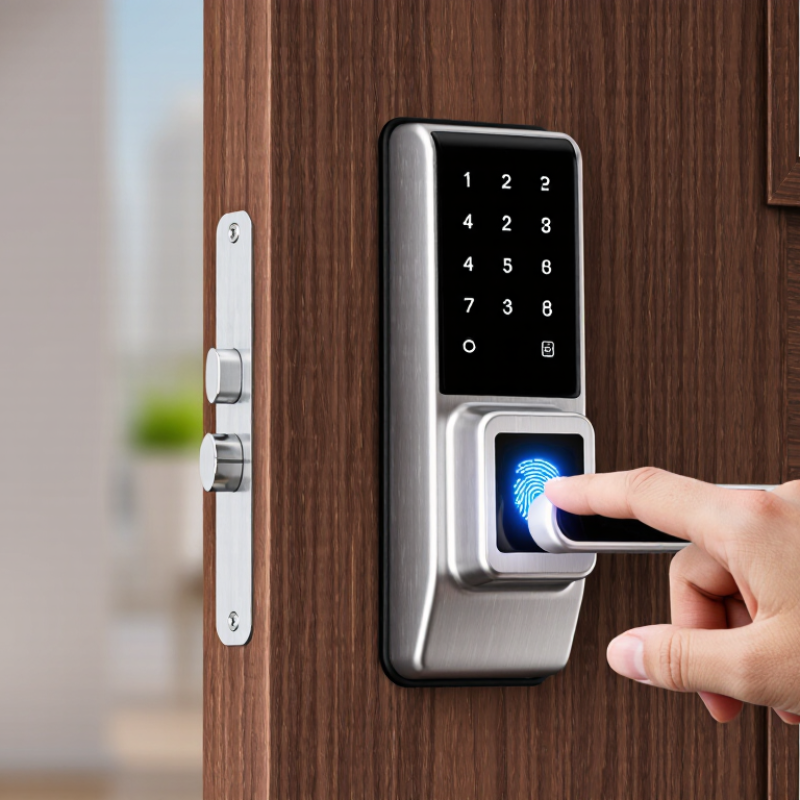
A Finger Scan Door Lock promises a simple routine: place a finger on the sensor, wait for recognition, and open the door. In practice, the details matter. A smudged sensor, wet hands, a low battery, or awkward installation can change the experience. Convenience matters. So does reliable access when the fingerprint reader is unavailable.

This guide compares ten options through practical features, including recognition methods, user capacity, backup entry, power alerts, and installation requirements. Product specifications can show what a lock offers, but they cannot guarantee identical performance on every door. Check compatibility before buying, and consider how household members will use the lock each day. Security technologist Bruce Schneier’s well-known reminder applies: “Security is a process, not a product.” A fingerprint reader is only one part of that process; setup, updates, and backup access deserve attention too. Small details count. No model is flawless. This ranking is a starting point, not a substitute for checking current specifications and choosing a lock that fits your door, routine, and comfort level.
What Are the Top 10 Finger Scan Door Locks?

How Fingerprint Door Locks Identify and Verify Users

A fingerprint door lock does not “read” a whole finger like a photograph. Its sensor captures ridge patterns, then software extracts features such as ridge endings and splits. These features form a template, usually stored on the lock or in its connected system. During entry, a fresh scan is compared with enrolled templates. A match score must cross a preset threshold. Too strict, and cold, dry fingertips may be rejected; too loose, and security weakens. Small practical details matter.

NIST’s SP 800-76-2 specifies 500 pixels per inch for certain fingerprint images used in identity systems. That is a useful quality reference, not a promise that every residential lock meets it. NIST SP 800-63B also gives a false match rate benchmark of one in 1,000 or better for biometric comparison in digital authentication. It is guidance, not a consumer door-lock certification. Still, no scan is magic. Wet skin, worn ridges, sensor dirt, and hurried placement can change results. Look for clear enrollment instructions, multiple-finger registration, and a way to enter when scans fail. A fast unlock feels reassuring; testing it with clean and slightly damp hands is wiser.

Key Features That Distinguish Fingerprint Door Locks

The strongest fingerprint door locks are distinguished by more than a quick scan. Sensor accuracy matters when fingers are damp, cold, or slightly dirty. A responsive reader should unlock smoothly without repeated attempts. Still, no sensor is perfect. Test it with the people who will use it every day.

Look closely at how many fingerprints the lock stores and whether access can be assigned separately. A clear keypad or physical key offers useful backup when batteries run low. Battery warnings, emergency power options, and a simple interior release are practical safeguards. Small details matter. Auto-lock timing, tamper alerts, and access history can also make everyday use easier, especially in a busy household.

Weather resistance is important for an exposed doorway, while installation compatibility depends on door thickness and existing hardware. Check these measurements before buying. App controls can be convenient, but they should not be the only way to enter or manage the lock. Privacy settings deserve attention, too: understand what access records are kept and how they can be removed. A sleek touchscreen may look impressive, yet a reliable reader and clear backup plan matter more than extra features you may rarely use.

What Are the Top 10 Finger Scan Door Locks? - Key Features That Distinguish Fingerprint Door Locks

No. Lock Type Fingerprint Access Other Common Entry Methods Power and Backup Connectivity Key Distinguishing Feature Practical Consideration
1 Keypad-and-Fingerprint Deadbolt Stores enrolled fingerprints for local unlocking. PIN code and physical key are common options. Usually battery-powered; many models provide an external emergency power contact or key override. Often standalone; connectivity depends on the model. Combines biometric entry with a familiar keypad and mechanical backup. Check door thickness, backset, and whether the existing deadbolt bore matches the lock.
2 Fingerprint Lever Lock Fingerprint reader is commonly built into the exterior lever or escutcheon. May include a PIN, key, or app-based access. Typically battery-powered, with backup arrangements varying by model. Standalone or app-connected versions are available. Lever-style operation can be convenient for interior doors and users who find knobs difficult to turn. Confirm whether it is rated and configured for an exterior entry door; some lever locks are intended for interior use.
3 Fingerprint Smart Deadbolt Uses an integrated fingerprint reader for keyless entry. Common options include PIN codes, a physical key, or smartphone control. Battery-powered; low-battery alerts and emergency access methods vary. May use Bluetooth, Wi-Fi, or a separate hub, depending on the model. Can pair biometric entry with remote features such as lock status or access management. Remote functions may require a hub, compatible network, account, or subscription; check the requirements before purchase.
4 Fingerprint-Enabled Mortise Lock Fingerprint access is integrated into a lock body fitted into a pocket in the door edge. May support a PIN, card, key, or app, depending on configuration. Power source and emergency override differ by design. Some models are standalone; others support connected access systems. Designed around a mortise lock case rather than a standard surface-mounted deadbolt. Requires compatible door preparation and careful measurement; replacement may be less straightforward than a deadbolt swap.
5 Fingerprint Rim Lock Reader is fitted into an exterior unit that operates a surface-mounted lock mechanism. May offer a PIN, card, key, or remote release. Often battery-powered; confirm how emergency power or manual entry works. Connectivity varies from none to app or access-control integration. Surface-mounted construction can suit some doors where a conventional deadbolt installation is unsuitable. Verify door swing, frame alignment, and compatibility with the existing rim-lock hardware.
6 Fingerprint Smart Lever with App Access Supports stored fingerprints, with enrollment and management features determined by the model. Often combines fingerprints with PINs, keys, or app credentials. Usually battery-powered, with battery alerts and backup access varying by product. May connect through Bluetooth, Wi-Fi, or a hub. App features can make it easier to manage users or review supported activity records. App functions and logs are model-specific; review privacy settings and network requirements.
7 Fingerprint Lock with RFID Card Reader Fingerprint is one of the supported credentials. Typically includes contactless cards or fobs; some versions also provide a PIN or key. Commonly battery-powered, with backup methods depending on the design. Can be standalone or integrated with compatible access-control equipment. Offers a card or fob alternative for people who do not want to use a fingerprint every time. Check card compatibility, credential enrollment limits, and how lost cards can be removed from access.
8 Fingerprint Lock with Mechanical Key Override Provides fingerprint entry for everyday use. Includes a physical key for authorized backup access; a PIN may also be available. Battery-operated electronics are backed up by a mechanical keyway. Often standalone, though connected models exist. A key override can provide an entry option if batteries are depleted or the electronic reader is unavailable. Keep backup keys secure and confirm the keyway is accessible without removing exterior trim.
9 Fingerprint Lock with Emergency USB Power Uses a built-in reader for enrolled fingerprints. May also support a PIN, app, card, or physical key. Some designs accept temporary power from an external USB power source when internal batteries are exhausted. Connectivity is model-dependent and may be absent. Emergency power can help restore electronic operation without opening the battery compartment from the inside. Emergency power is not the same as a permanently rechargeable battery; check the specified port and backup procedure.
10 Fingerprint Access-Control Lock Uses biometric credentials and may support centrally managed user enrollment. May include PINs, cards, or credentials managed by a compatible system. Power and emergency-release arrangements depend on the installation. Designed for integration with compatible access-control systems; capabilities vary. Can suit settings where administrators need to manage users and permissions across an installation. Check system compatibility, installation requirements, data handling, and any applicable fire or egress rules.

These are common fingerprint-lock configurations, not a ranking of specific products. Available credentials, capacity, connectivity, backup methods, and installation requirements vary by model.

How the Top 10 Fingerprint Door Locks Compare

What Are the Top 10 Finger Scan Door Locks?
How the Top 10 Fingerprint Door Locks Compare

A useful comparison looks beyond how quickly a lock opens in a product demonstration. Check recognition consistency, enrollment capacity, backup access, battery alerts, and weather protection. A sensor should read reliably when a fingertip is slightly dry or damp, not only under ideal conditions. That matters. Also compare how easily you can add or remove household users, and whether the lock records entry events.

NIST Special Publication 800-63B sets a false match rate benchmark of 1 in 1,000 or better for biometric systems. This is guidance for digital identity authentication, not a performance guarantee for residential door locks. Still, it offers a useful reference point when reviewing manufacturers’ test claims. Ask whether figures come from independent testing and whether they describe false matches, failed reads, or both. These measures are not interchangeable.

For the ten locks, compare the practical fallback: keypad, physical key, or another access method. Look for clear low-battery warnings and a way to regain entry if power runs out. Check the stated environmental rating before installing a lock on an exposed door. A high recognition rate on paper can hide frustrating failures in cold weather or with worn fingerprints. No ranking is perfect. Installation, door alignment, and sensor cleanliness can change everyday results.

Security, Privacy, and Backup Access Options

What Are the Top 10 Finger Scan Door Locks?

Security, Privacy, and Backup Access Options

A useful comparison looks beyond the fingerprint reader. Check how many fingerprints the lock stores, whether access records can be reviewed, and how administrators remove old users. A sensor should read reliably after ordinary hand washing, but wet or dusty fingers may still cause trouble. Test the keypad or app, too. A fingerprint is convenient, not infallible. Look for clear instructions on data storage and account protection. If the product does not explain where biometric data is kept, treat that as a reason to investigate further.

Tips: Enroll more than one trusted finger. Use a strong account password, and review app permissions. Keep access logs private. Small habits matter.

Backup access deserves equal attention. A physical key, external emergency power connection, or separate PIN can help when batteries run low or the sensor fails. Confirm the backup method before installation, and keep any spare key somewhere secure but reachable. Avoid hiding it beside the door. Check battery warnings regularly; a warning is easy to ignore during a busy week. Also consider who can reset the lock and whether that process removes saved fingerprints. A well-designed lock should make recovery understandable, though no setup is completely foolproof. Test the backup while the door is open.

How to Choose, Install, and Maintain a Fingerprint Door Lock

What Are the Top 10 Finger Scan Door Locks? How to Choose, Install, and Maintain a Fingerprint Door Lock

A reliable fingerprint door lock should fit your door, support backup entry, and store prints securely. Compare sensor response, weather resistance, battery alerts, and emergency power options.

NIST Special Publication 800-63B sets a useful biometric benchmark: a false-match rate of 1 in 1,000 or better, with a false non-match rate below 5%. This guidance is not a certification for consumer locks, so check each model’s independent test details. Numbers matter.

Before buying, measure your door thickness and backset, then confirm the lock suits your deadbolt and handing. During installation, keep the bolt aligned with the strike plate; even slight friction can drain batteries or cause failed locking. Enroll more than one finger, using clean, dry fingertips from different angles. Test the keypad or key backup before relying on the fingerprint reader. A hurried setup can leave a dependable-looking lock awkward to use.

Tips:

Wipe the sensor with a soft, dry cloth; avoid abrasive cleaners. Replace batteries when alerts appear, and test access after every battery change. Recheck the bolt monthly for smooth movement. Keep a backup entry method available. Fingerprint recognition can vary with moisture, cuts, or worn ridges; that is inconvenient, and no sensor is perfect. A simple maintenance log helps reveal recurring errors before they become lockouts.

Copyright 2025 Fluidra S.A. | Created by BCM Marketing Agencia Privacy Policy Legal note | Cookie policy |

Technical cookies are strictly necessary for our website to work and you can navigate through it. These types of cookies are those that, for example, allow us to identify you, give you access to certain restricted parts of the page if necessary, or remember different options or services already selected by you, such as your privacy preferences. Therefore, they are activated by default, your authorization not being necessary in this regard. Through the configuration of your browser, you can block or alert the presence of this type of cookies, although such blocking will affect the proper functioning of the different functionalities of our website.


The analysis cookies allow us to study the navigation of the users of our website in general (for example, which sections of the page are the most visited, which services are used most and if they work correctly, etc.). From the statistical information on navigation on our website, we can improve both the operation of the page itself and the different services it offers. Therefore, these cookies do not have an advertising purpose, but only serve to make our website work better, adapting to our users in general. By activating them you will contribute to this continuous improvement. You can enable or disable these cookies by checking the corresponding box, being disabled by default.


Functionality cookies allow us to remember your preferences, to personalize certain characteristics and general options of our website, every time you access it (for example, the language in which the information is presented to you, the sections marked as favorites, your browser type, etc.) Therefore, this type of cookies does not have an advertising purpose, but by activating them you will improve the functionality of the website (for example, adapting to your type of browser) and the customization of it based on your preferences (for example, by presenting the information in the language that you have chosen in previous occasions), which will contribute to the ease, usability and comfort of our page during your navigation. You can enable or disable these cookies by checking the corresponding box, being disabled by default.


Advertising cookies allow us to manage the advertising spaces included in our website based on criteria such as the content shown or the frequency in which the ads are displayed. For example, if you have been shown the same ad several times on our website, and you have not shown a personal interest by clicking on it, it will not appear again. In summary, by activating this type of cookies, the advertising shown on our website will be more useful and diverse, and less repetitive. You can enable or disable these cookies by checking the corresponding box, being disabled by default.


Behavioral advertising cookies allow us to obtain information based on the observation of your browsing habits and behaviors on the web, in order to show you advertising content that best suits your personal tastes and interests. To understand it in a very simple way, we will give you a fictitious example: if your last searches on the web were related to suspense literature, we would show you advertising about suspense books. Therefore, activating this type of cookies, the advertising that we show you on our website will not be generic, but will be oriented to your searches, tastes and interests, therefore adjusting exclusively to you. You can enable or disable these cookies by checking the corresponding box, being disabled by default.
To understand it in a very simple way, we will give you a fictitious example: if your last searches on the web were related to suspense literature, we would show you advertising about suspense books. Therefore, activating this type of cookies, the advertising that we show you on our website will not be generic, but will be oriented to your searches, tastes and interests, therefore adjusting exclusively to you. You can enable or disable these cookies by checking the corresponding box, being disabled by default.

SAVE

We use our own and third-party cookies to ensure the proper functioning of the website and to analyse our services, improve your experience on our website and show you advertisements related to your interests according to profiling based on your browsing habits (e.g. websites visited). You can accept all cookies by clicking "ACCEPT" or set or reject them by clicking here. If you would like to know more about the use of cookies, please see our COOKIE POLICY.


ACCEPT ALL
Reject no essentials