7 RFID Printer Buying Tips for Global Buyers
FLUID HANDLING EXPERTS

Blog, all our news

7 RFID Printer Buying Tips for Global Buyers

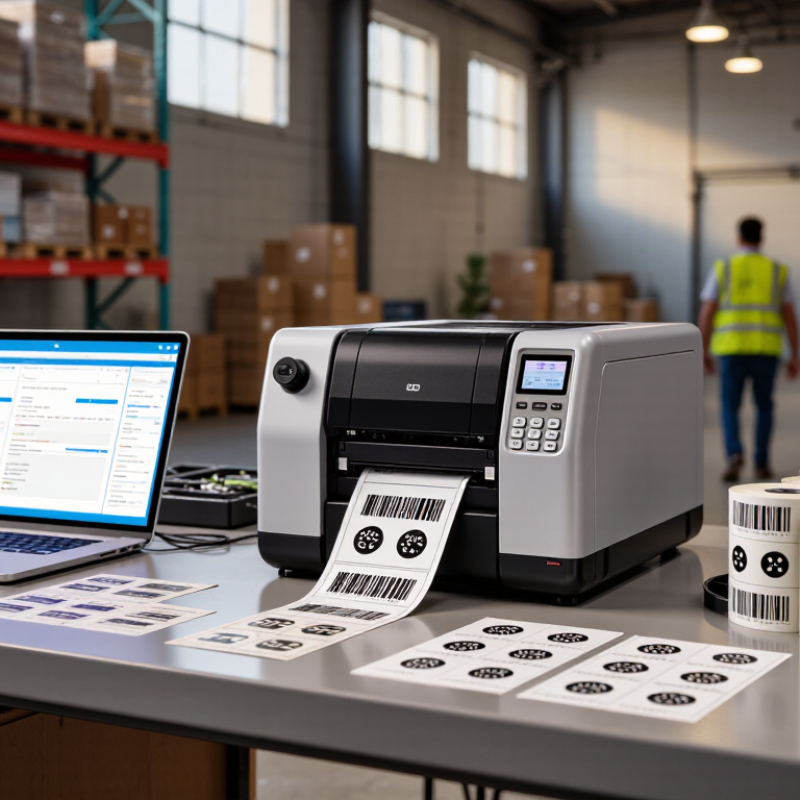
Buying an Rfid Printer for global operations is not a simple hardware decision. It affects labeling speed, inventory accuracy, encoding reliability, and long-term operating costs. A printer that performs well in a quiet office may struggle beside a busy warehouse dock, where dust, vibration, and changing label sizes are common.

Mark Roberti, founder of RFID Journal, has emphasized, “RFID is not a technology project; it is a business process project.” That perspective matters. Buyers should examine the complete workflow, not only print resolution or purchase price. The seven tips in this guide explore RFID compatibility, print quality, encoding performance, software integration, consumable costs, service support, and international deployment needs. Each factor can influence whether a printer produces dependable labels or expensive rework.

Small details matter. A roll may fit the printer but fail during high-speed encoding. A familiar software platform may require extra configuration. Regional service coverage may look acceptable on paper, yet replacement parts could take weeks to arrive. These risks deserve practical attention.

There is no perfect checklist. A model praised by one manufacturer may not suit another facility. Testing real labels, tags, adhesives, and data formats is wiser than trusting a brochure alone. Buyers should also question their own assumptions. The lowest upfront price can become costly through waste, downtime, and manual verification. A careful Rfid Printer evaluation connects technical specifications with daily work, measurable results, and realistic support expectations.
7 RFID Printer Buying Tips for Global Buyers

Define RFID Requirements: UHF 860–960 MHz, HF 13.56 MHz, and Read Range

7 RFID Printer Buying Tips for Global Buyers

Define RFID requirements before comparing printer prices.

UHF RFID typically operates between 860 and 960 MHz. However, permitted channels differ across regions. Confirm the target market’s frequency rules before ordering equipment.

UHF suits cartons, pallets, and dock-door identification. Its read range can reach several meters in open conditions. Real results often shrink near metal or liquids.

HF RFID operates at 13.56 MHz. It usually provides shorter reading distances and controlled, close-range interactions. This can suit documents, retail items, access cards, and small product tracking.

A printer must support the selected inlay design, not merely the frequency.

Test labels on the actual material, including glass bottles, foil packaging, or damp cardboard. A clean laboratory result may not survive a busy warehouse.

Read range is not a fixed specification. Tag orientation, antenna placement, printer encoding quality, and reader power all affect performance. Ask for measured results using your label stock.

Check failed-write rates during continuous printing. My first assumption was that longer range always improved productivity. It did not. Excessive range created unintended reads near adjacent pallets.

A practical pilot should measure successful encoding, label waste, and operator handling time. Also verify regional radio compliance and maintain traceable test records.

Verify Standards: EPC Gen2v2, ISO/IEC 18000-63, and GS1 Encoding

When buying an RFID printer for global operations, verify its supported standards before comparing speed or price. EPC Gen2v2 defines modern UHF RFID communication and security functions. The printer, encoder, and tags must support compatible command features. A specification sheet alone is not enough.

Check whether the device supports ISO/IEC 18000-63, including the required air-interface options for your target markets. Regional frequency rules can affect performance. Ask for test records, supported frequency ranges, and firmware details.

Also confirm GS1 encoding support. GS1 rules govern identifiers, data structures, and memory placement. Printing a readable barcode does not prove correct RFID encoding.

Request a live demonstration using your actual label stock. Test EPC memory, user memory, lock settings, and read accuracy at normal production speed. Inspect the encoded data with an independent RFID reader, not only the printer software. Small differences in item references or serial numbers can create costly tracking errors.

I have seen teams approve equipment after testing clean labels only. Packaging, foil, liquids, and curved surfaces later changed the results. A rushed check can miss that.

Ask how firmware updates preserve encoding templates and security settings. Confirm whether the supplier provides documented GS1 implementation guidance and technical support across regions. No checklist is perfect. Leave room for field testing.

Compare Printer Performance: 203/300 dpi, 6–12 ips, and Tag Compatibility

Printer performance starts with the label, not the advertised maximum. For small text, dense barcodes, or tiny inlays, 300 dpi gives cleaner edges than 203 dpi. For general pallet and carton labels, 203 dpi can be adequate and cheaper. A printer rated at 6–12 ips may slow during encoding, calibration, or tag verification. RAIN Alliance’s 2024 industry report recorded 52.5 billion RAIN RFID ICs sold in 2023. That scale makes practical throughput testing essential. My field experience is clear: a fast print engine means little when reject rates rise.

Tip: compare usable speed, not peak speed. Print 100–200 tags using your actual media, ribbon, darkness, and encoding workflow. Record good tags per minute, not inches per second alone. Watch label registration at 12 ips. It can drift. Tag compatibility depends on chip design, antenna shape, adhesive, face stock, and liner. The GS1 EPC Tag Data Standard defines the data structure. It cannot guarantee reliable printing or verification for every inlay.

Tip: require a sample run before purchase. Ask for verification results across each target tag family. Measure read rates after printing, not only visual quality. ISO/IEC 18000-63 compliance supports UHF interoperability, but printer settings still need tuning. Choose adjustable darkness, calibration, and rewind controls. One overlooked issue is waste. A 300 dpi model may improve detail, yet increase consumable cost or reduce speed. I would leave room for error: real tags vary, and glossy stock often exposes weak settings.

7 RFID Printer Buying Tips for Global Buyers - Compare Printer Performance: 203/300 dpi, 6–12 ips, and Tag Compatibility

Tip Performance Dimension Typical Specification Best-Fit Application What Global Buyers Should Check Practical Buying Recommendation
1 Print resolution 203 dpi for standard text and barcodes; 300 dpi for smaller text, fine graphics, and compact labels 203 dpi: cartons, pallets, shipping labels
300 dpi: healthcare, jewelry, electronics, and small product labels
Confirm the smallest font, barcode width, label size, and scanner requirements used in each destination market Choose 203 dpi for general logistics work; select 300 dpi when readability or small-format printing is critical
2 Print speed 6–8 ips for balanced production; 10–12 ips for high-volume workflows, subject to media and print quality 6–8 ips: warehouses, retail, and manufacturing lines with moderate demand
10–12 ips: distribution centers and automated print-and-apply systems
Measure actual labels per minute, including pauses for RFID encoding, verification, cutting, and rewinding Do not select speed by headline rating alone; request a test using the intended label length and encoding process
3 RFID tag compatibility UHF RFID support based on EPC Class 1 Gen 2 / ISO 18000-63; compatible inlays vary by material and frequency region Supply-chain labels, apparel tags, retail goods, cartons, and pallet identification Test the exact inlay, adhesive, face stock, memory size, read range, and packaging material; verify regional UHF requirements Obtain sample tags before purchase and confirm encoding success rates above the operational target
4 Encoding and verification Integrated RFID encoder with read-after-write verification and failed-tag handling Serialized item labels, compliance labeling, and applications requiring traceable EPC data Check supported EPC memory blocks, lock and kill commands, error alerts, retry behavior, and rejected-label marking Prioritize verified encoding and clear error recovery over maximum mechanical speed
5 Media and ribbon flexibility Direct thermal or thermal-transfer printing; support for common label widths, roll diameters, and liner types Direct thermal: short-life shipping labels
Thermal transfer: durable labels exposed to abrasion, heat, or chemicals
Verify media calibration, liner thickness, ribbon width, core size, maximum roll diameter, and adhesive performance Select thermal transfer for long-term durability and direct thermal for simpler, short-term applications
6 Connectivity and integration USB and Ethernet are common; Wi-Fi, serial, industrial protocols, and web management may be available Standalone workstations, warehouse management systems, enterprise resource planning systems, and production lines Confirm language support, driver compatibility, print-command support, network security, remote monitoring, and regional voltage options Use wired Ethernet for stable fixed installations; add wireless connectivity only when mobility is necessary
7 Total cost and serviceability Evaluate purchase price together with tags, ribbons, printheads, maintenance, rejected labels, energy use, and downtime All international deployments, especially multi-site operations with different service and import conditions Compare warranty coverage, spare-part availability, local technical support, customs requirements, lead times, and operator training Calculate cost per successfully encoded and verified label rather than cost per printed label

Note: Actual performance depends on label dimensions, media construction, RFID inlay design, print darkness, encoding settings, software, and operating conditions. Always validate the complete label-and-tag combination before deployment.

Assess RFID Validation: Read-Rate Testing, Error Detection, and Calibration

RFID validation should be tested before a printer enters daily production. Do not rely on a single successful scan. Place sample labels on actual cartons, trays, or envelopes, then measure read rates across different positions. Record results from the front, side, and rear of each package. A 98% read rate may still create costly exceptions at scale.

Use varied materials during testing. Liquid containers, metal surfaces, dense packaging, and stacked labels can weaken performance. Check whether the printer identifies missing, damaged, or incorrectly encoded tags. The system should stop or flag the job when data fails validation. Small details matter, such as a visibly printed label with an unreadable chip. Test again. Log every result.

Calibration should match the label design, media, antenna position, and operating speed. Adjust encoding power, print darkness, and feed alignment carefully. Then repeat testing after changing any major setting. In practice, rushed calibration often looks acceptable during a short trial but fails after several hours. That weakness is easy to overlook. I would also keep failed samples for review, rather than discarding them immediately. They can reveal recurring patterns, including edge damage or inconsistent placement. A clear test record helps technical teams compare equipment objectively and supports dependable purchasing decisions across different facilities.

RFID Validation Benchmark: Read Rate, Error Detection, and Calibration

A practical validation sequence should test different tag and material conditions, identify encoding or verification errors, and confirm that calibration maintains stable read performance.

Read rate represents successfully verified tags divided by total tags tested. Error rate includes failed reads, encoding mismatches, and duplicate or missing EPC checks. The example benchmark uses a 500-tag sample per test condition and illustrates typical validation metrics rather than any specific printer or brand.

Calculate Global TCO: Media, Connectivity, Duty Cycle, Service, and Compliance

7 RFID Printer Buying Tips for Global Buyers

Calculate Global TCO: Media, Connectivity, Duty Cycle, Service, and Compliance

A low purchase price rarely reflects the real global cost. Calculate media, connectivity, duty cycle, service, and compliance before approval.

Media costs include RFID labels, inlays, ribbons, liner waste, and regional shipping. Test several label materials with your actual products. Small differences in rejection rates can become expensive across millions of prints.

Connectivity also affects installation and support. Confirm network security, interface compatibility, wireless availability, and local power requirements. A printer may work perfectly in one warehouse but require extra equipment elsewhere. Costs hide everywhere.

Check the expected daily volume against the printer’s recommended duty cycle. Overuse can increase downtime, printhead replacement, and maintenance labor. Ask for service intervals, spare-part availability, technician response times, and training options in each target market. Service matters.

Import duties, taxes, certification fees, and recycling obligations can change the landed cost. Verify radio-frequency approvals, electrical standards, labeling rules, and data protection requirements with qualified local specialists. Requirements may differ between neighboring countries.

Use a three-year TCO model with realistic exchange rates and shipping assumptions. Include consumables, repairs, rejected labels, software integration, and operator time. Keep the model transparent, so finance and operations can challenge the numbers.

Forecasts are imperfect. Leave room for demand swings and unexpected compliance delays. A practical pilot often reveals costs that a spreadsheet misses.

Copyright 2025 Fluidra S.A. | Created by BCM Marketing Agencia Privacy Policy Legal note | Cookie policy |

Technical cookies are strictly necessary for our website to work and you can navigate through it. These types of cookies are those that, for example, allow us to identify you, give you access to certain restricted parts of the page if necessary, or remember different options or services already selected by you, such as your privacy preferences. Therefore, they are activated by default, your authorization not being necessary in this regard. Through the configuration of your browser, you can block or alert the presence of this type of cookies, although such blocking will affect the proper functioning of the different functionalities of our website.


The analysis cookies allow us to study the navigation of the users of our website in general (for example, which sections of the page are the most visited, which services are used most and if they work correctly, etc.). From the statistical information on navigation on our website, we can improve both the operation of the page itself and the different services it offers. Therefore, these cookies do not have an advertising purpose, but only serve to make our website work better, adapting to our users in general. By activating them you will contribute to this continuous improvement. You can enable or disable these cookies by checking the corresponding box, being disabled by default.


Functionality cookies allow us to remember your preferences, to personalize certain characteristics and general options of our website, every time you access it (for example, the language in which the information is presented to you, the sections marked as favorites, your browser type, etc.) Therefore, this type of cookies does not have an advertising purpose, but by activating them you will improve the functionality of the website (for example, adapting to your type of browser) and the customization of it based on your preferences (for example, by presenting the information in the language that you have chosen in previous occasions), which will contribute to the ease, usability and comfort of our page during your navigation. You can enable or disable these cookies by checking the corresponding box, being disabled by default.


Advertising cookies allow us to manage the advertising spaces included in our website based on criteria such as the content shown or the frequency in which the ads are displayed. For example, if you have been shown the same ad several times on our website, and you have not shown a personal interest by clicking on it, it will not appear again. In summary, by activating this type of cookies, the advertising shown on our website will be more useful and diverse, and less repetitive. You can enable or disable these cookies by checking the corresponding box, being disabled by default.


Behavioral advertising cookies allow us to obtain information based on the observation of your browsing habits and behaviors on the web, in order to show you advertising content that best suits your personal tastes and interests. To understand it in a very simple way, we will give you a fictitious example: if your last searches on the web were related to suspense literature, we would show you advertising about suspense books. Therefore, activating this type of cookies, the advertising that we show you on our website will not be generic, but will be oriented to your searches, tastes and interests, therefore adjusting exclusively to you. You can enable or disable these cookies by checking the corresponding box, being disabled by default.
To understand it in a very simple way, we will give you a fictitious example: if your last searches on the web were related to suspense literature, we would show you advertising about suspense books. Therefore, activating this type of cookies, the advertising that we show you on our website will not be generic, but will be oriented to your searches, tastes and interests, therefore adjusting exclusively to you. You can enable or disable these cookies by checking the corresponding box, being disabled by default.

SAVE

We use our own and third-party cookies to ensure the proper functioning of the website and to analyse our services, improve your experience on our website and show you advertisements related to your interests according to profiling based on your browsing habits (e.g. websites visited). You can accept all cookies by clicking "ACCEPT" or set or reject them by clicking here. If you would like to know more about the use of cookies, please see our COOKIE POLICY.


ACCEPT ALL
Reject no essentials