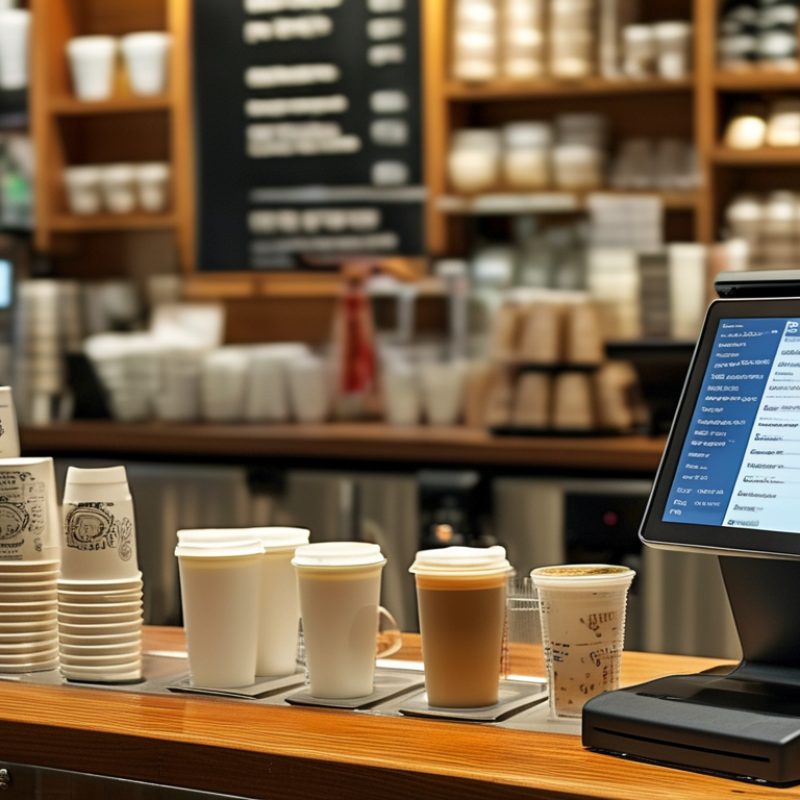
Choosing the right Cafe Pos System in 2026 is no longer a simple matter of comparing screen designs. A busy café needs technology that survives breakfast queues, custom milk requests, split payments, and sudden internet failures. The 2024 National Restaurant Association State of the Restaurant Industry report projected more than $1 trillion in U.S. restaurant sales, while identifying labor costs and operational efficiency as continuing challenges. These pressures make practical software decisions increasingly important.
A reliable Cafe Pos System should connect sales, inventory, staff management, customer loyalty, online ordering, and accounting without creating extra work. The Square Future of Commerce reports have repeatedly highlighted the growing importance of integrated commerce tools for small businesses. Meanwhile, payment-security guidance from the PCI Security Standards Council reinforces the need for careful handling of cardholder data. Security cannot be an afterthought. Neither can offline processing.
This guide examines the features that matter behind the counter. It considers transaction speed, menu flexibility, hardware durability, reporting depth, subscription costs, support quality, and integration limits. A polished demo may look impressive. It may still fail during a Saturday rush. Owners should test realistic workflows, including refunds, modifiers, stock shortages, and staff permissions. No system is perfect. Even experienced operators can overlook data migration or contract restrictions. The best choice balances measurable performance with the café’s daily habits, growth plans, and budget. That balance creates a more dependable investment than choosing the cheapest package or the most fashionable interface.
What a Cafe POS System Does and Why It Matters in 2026
A cafe POS system is more than a digital cash register. It connects ordering, payments, kitchen tickets, inventory, staff permissions, and sales reports. In 2026, a barista may take an order at a patio table, adjust oat milk, split a bill, and send the ticket directly to the kitchen. The system should handle each step without forcing staff to repeat information.
The National Restaurant Association’s 2025 State of the Restaurant Industry report projects $1.5 trillion in U.S. restaurant sales and 15.9 million jobs. That scale makes small delays expensive. A reliable POS can reduce order mistakes, flag low coffee-bean stock, and show which products sell during morning rushes. The 2025 Global Payments Report estimates digital wallets represented 53% of global e-commerce transaction value in 2024. Cafes therefore need flexible payment support, strong security, and clear refund controls. Speed matters, but accuracy matters more.
Owners should test the system during a real rush, not only during a sales demonstration. Check offline operation, receipt clarity, staff training, data exports, and integration costs. I have seen operators overvalue attractive dashboards. A beautiful report cannot repair poor workflows. Some advanced features may remain unused, and that is acceptable. Choose tools that solve today’s bottlenecks while leaving room for additional locations, channels, and changing customer habits.
How to Choose the Best Cafe POS System in 2026
Recommended evaluation priorities for a modern cafe POS system
In 2026, cafes should evaluate POS systems by how well they improve checkout speed, order accuracy, inventory visibility, reporting, payment security, and integration flexibility. The percentages represent practical evaluation weights for comparing solutions, not company or brand market share.
Key Features to Assess for Cafe Operations
How to Choose the Best Cafe POS System in 2026?
Key Features to Assess for Cafe Operations
A cafe POS system should match the rush, not simply display prices. During busy mornings, staff need quick ordering, clear modifiers, and fast payment approval. Test the system with real orders, such as oat milk changes, extra syrup, and split bills. Small delays become serious when ten customers wait near the counter. A clean interface also reduces training time for new employees.
Inventory control deserves close attention. The system should track coffee beans, milk, pastries, and packaging by item or recipe. Low-stock alerts can prevent awkward menu shortages. However, automated counts are not always accurate. I have seen waste, portion changes, and supplier delays create misleading reports. Managers should compare digital records with physical stock each week.
Reliable reporting helps owners understand hourly sales, popular products, labor costs, and refund patterns. Staff permissions should limit sensitive actions without slowing service. Offline payment support can protect operations during short internet failures, but its security settings require careful review. Check encryption, data backups, software updates, and customer support response times. Ask for practical training, not only a polished demonstration. Accessibility matters too, especially for employees using different devices or working under dim counter lighting.
How to Compare POS Costs, Hardware, and Payment Options
Choosing the best cafe POS system in 2026 starts with the counter, not the sales pitch. Watch one busy morning before comparing features. Can a new cashier open an order quickly? Can staff split a bill without calling a manager? Small delays become long queues.
Compare the full cost, not only the monthly subscription. Include setup, software access, payment processing, support, hardware replacement, and cancellation fees. Small fees accumulate. A touchscreen, receipt printer, cash drawer, barcode scanner, and kitchen display may all affect your budget. Test the equipment during a rush. Bright sunlight, wet fingers, and dropped internet can expose weaknesses that a showroom hides.
Payment flexibility deserves close attention. Check whether the system accepts cards, contactless payments, mobile wallets, refunds, tips, and partial payments. Ask how fees are calculated for different transaction amounts. A lower monthly price may still cost more through higher processing rates. Request a written quote using your estimated sales volume and average ticket size. Also ask about payment security, data access, and service support in your region. Do not trust a polished demo alone. Use your real menu, modifiers, discounts, and split bills. Staff may skip prompts when tired, so simple workflows matter. I would leave time for training, because even reliable software can feel awkward during its first week.
How to Choose the Best Cafe POS System in 2026? — How to Compare POS Costs, Hardware, and Payment Options
POS Configuration
Typical Monthly Software Cost
Typical Upfront Hardware Cost
Payment Processing Options
Typical Card Processing Cost
Offline Capability
Core Cafe Features
Best Fit
Entry-Level Tablet POS
$0–$80 per location
$400–$1,200
Integrated card reader, contactless payments, chip cards, mobile wallets, cash
Commonly about 2.4%–3.5% plus a fixed fee per transaction
Commonly about 2.2%–3.4% plus a fixed fee per transaction
Moderate
Order-ahead workflows, queue management, kitchen routing, upselling prompts, digital receipts
High-volume takeaway cafes and venues focused on reducing queue times
Cost comparison notes: The figures above are typical U.S. market planning ranges for 2026 and exclude sales tax, installation, internet service, premium add-ons, custom integrations, and hardware replacement. Actual card costs depend on card type, transaction volume, risk profile, pricing model, and negotiated terms. When comparing systems, calculate the total three-year cost, including subscription fees, payment fees, hardware, support, chargebacks, and data migration.
Evaluating Integrations, Security, and Ease of Use
How to Choose the Best Cafe POS System in 2026?
Evaluating Integrations, Security, and Ease of Use
A busy cafe exposes a POS system’s weaknesses quickly. During a morning rush, staff need clear buttons, fast checkout, and minimal screen changes. Test the system with real orders, including custom milk choices, split payments, refunds, and discounts. A short training session can reveal more than a polished sales demonstration. If a new employee cannot complete an order confidently, the system may be too complex.
Integrations should support daily operations, not create another maintenance task. Check connections with payment terminals, accounting software, inventory tools, online ordering, and loyalty programs. Ask whether data syncs instantly or requires manual exports. Reliable APIs and clear error messages matter when an order fails. I would also test a temporary internet outage. Offline processing can protect sales, but it may create duplicate transactions later.
Security deserves practical testing. Look for encryption, multi-factor authentication, role-based permissions, automatic updates, and detailed activity logs. Managers should see reports, while temporary staff should access only essential functions. Confirm how customer data is stored, backed up, and deleted. Ask about independent security assessments and incident response procedures. No system is perfect. A feature-rich platform may still frustrate staff, while a simpler one may lack useful controls. Leave room for doubt, and run a limited trial before committing.
Steps for Selecting and Implementing the Right Cafe POS System
Choosing a cafe POS system in 2026 should begin with your daily workflow, not a feature checklist.
The National Restaurant Association projected U.S. restaurant and foodservice sales at $1.5 trillion in 2025, increasing pressure on small cafes to process orders efficiently. Observe one busy morning. Record queue length, modifiers, refunds, table changes, and payment delays. Small details expose expensive problems.
Write a requirements list before speaking with suppliers. Include menu editing, inventory tracking, staff permissions, digital receipts, accounting connections, and offline payment procedures. The 2024 Restaurant Technology Landscape Report identified integrated technology and operational efficiency as major investment priorities for foodservice operators.
Ask for transparent pricing, including hardware, software, installation, support, and payment fees. Cheap rarely stays cheap. Test the system with real orders, such as oat-milk changes, split payments, and cancelled drinks. A polished demonstration can hide awkward steps.
Implementation needs its own plan. Export menu data carefully, create staff roles, and train employees during quiet shifts. Keep the old process available briefly, but avoid running two systems for too long. Track order accuracy, average service time, voids, and stock differences for the first four weeks.
PCI Security Standards Council guidance also supports limiting payment-data access and assigning clear responsibilities. I would not assume every integration works perfectly; printers fail, networks drop, and staff forget shortcuts. Review the first month with the team, then adjust settings based on evidence rather than sales promises.
Cepex is the brand for the fluid handling market belonging to the Fluidra group. One of the leading european manufacturer of valves and fittings in thermoplastic materials.
Dedicated to the swimming pool, irrigation and industrial markets, we distribute our products worldwide with the Fluidra commercial network and presence in 46 countries with 136 sales branches.
Your data will be processed by CEPEX S.A., with address at C. Lluís Companys, 51-53, 08400, Granollers (Barcelona), and C.I.F. nº A-08928707, to send you communications about our products based on your interests. You can consult more information about the processing of your data and how to exercise your rights as described in the Privacy Policy.
Technical cookies are strictly necessary for our website to work and you can navigate through it. These types of cookies are those that, for example, allow us to identify you, give you access to certain restricted parts of the page if necessary, or remember different options or services already selected by you, such as your privacy preferences. Therefore, they are activated by default, your authorization not being necessary in this regard. Through the configuration of your browser, you can block or alert the presence of this type of cookies, although such blocking will affect the proper functioning of the different functionalities of our website.
The analysis cookies allow us to study the navigation of the users of our website in general (for example, which sections of the page are the most visited, which services are used most and if they work correctly, etc.). From the statistical information on navigation on our website, we can improve both the operation of the page itself and the different services it offers. Therefore, these cookies do not have an advertising purpose, but only serve to make our website work better, adapting to our users in general. By activating them you will contribute to this continuous improvement. You can enable or disable these cookies by checking the corresponding box, being disabled by default.
Functionality cookies allow us to remember your preferences, to personalize certain characteristics and general options of our website, every time you access it (for example, the language in which the information is presented to you, the sections marked as favorites, your browser type, etc.) Therefore, this type of cookies does not have an advertising purpose, but by activating them you will improve the functionality of the website (for example, adapting to your type of browser) and the customization of it based on your preferences (for example, by presenting the information in the language that you have chosen in previous occasions), which will contribute to the ease, usability and comfort of our page during your navigation. You can enable or disable these cookies by checking the corresponding box, being disabled by default.
Advertising cookies allow us to manage the advertising spaces included in our website based on criteria such as the content shown or the frequency in which the ads are displayed. For example, if you have been shown the same ad several times on our website, and you have not shown a personal interest by clicking on it, it will not appear again. In summary, by activating this type of cookies, the advertising shown on our website will be more useful and diverse, and less repetitive. You can enable or disable these cookies by checking the corresponding box, being disabled by default.
Behavioral advertising cookies allow us to obtain information based on the observation of your browsing habits and behaviors on the web, in order to show you advertising content that best suits your personal tastes and interests. To understand it in a very simple way, we will give you a fictitious example: if your last searches on the web were related to suspense literature, we would show you advertising about suspense books. Therefore, activating this type of cookies, the advertising that we show you on our website will not be generic, but will be oriented to your searches, tastes and interests, therefore adjusting exclusively to you. You can enable or disable these cookies by checking the corresponding box, being disabled by default. To understand it in a very simple way, we will give you a fictitious example: if your last searches on the web were related to suspense literature, we would show you advertising about suspense books. Therefore, activating this type of cookies, the advertising that we show you on our website will not be generic, but will be oriented to your searches, tastes and interests, therefore adjusting exclusively to you. You can enable or disable these cookies by checking the corresponding box, being disabled by default.
We use our own and third-party cookies to ensure the proper functioning of the website and to analyse our services, improve your experience on our website and show you advertisements related to your interests according to profiling based on your browsing habits (e.g. websites visited). You can accept all cookies by clicking "ACCEPT" or set or reject them by clicking here. If you would like to know more about the use of cookies, please see our COOKIE POLICY.