7 Tips for Choosing a Wireless Intercom for the Elderly?
FLUID HANDLING EXPERTS

Blog, all our news

7 Tips for Choosing a Wireless Intercom for the Elderly?

As populations age, communication at home is becoming a safety and independence issue. The World Health Organization projects that one in six people worldwide will be aged 60 or older by 2030. Many older adults also prefer familiar surroundings. AARP’s 2021 Home and Community Preferences Survey found that 77% of adults aged 50 and above want to remain in their current homes.

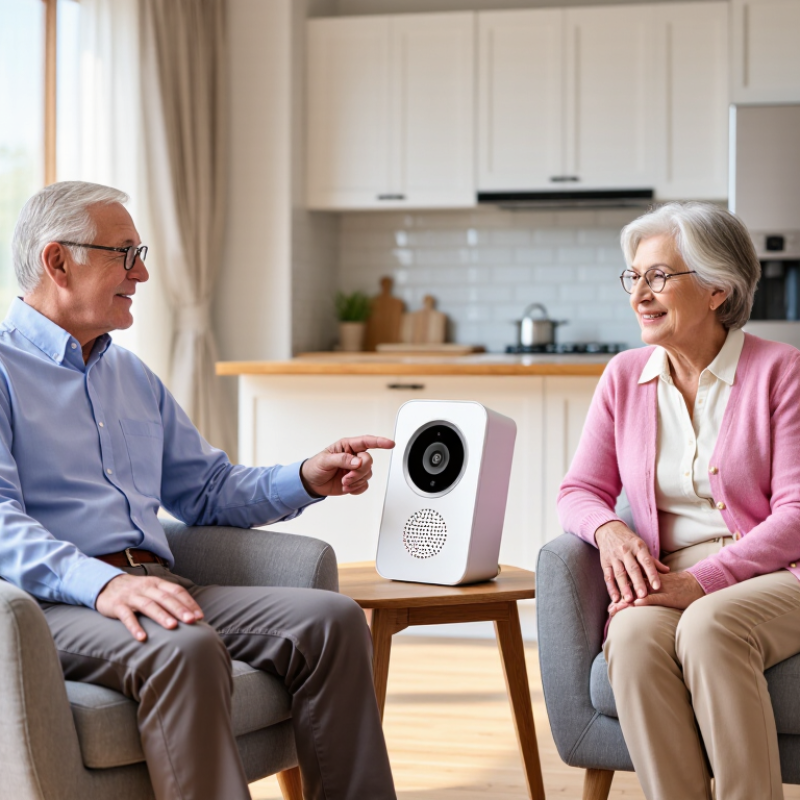
That preference gives the Wireless Intercom For Elderly a practical role. A clear voice link can connect a bedroom, kitchen, entrance, or caregiver’s room without requiring a smartphone. Imagine an older user pressing one large button beside the bed. The response should sound immediate, not distant or confusing. Volume, range, battery life, privacy, and emergency usability all matter.

Technology is only part of the decision. Joseph Coughlin, director of the MIT AgeLab, said, “The future of aging is not about technology. It’s about the human experience.” His point deserves attention. A device may have impressive specifications yet fail beside a noisy kitchen or during a power outage. This guide examines seven practical tips for choosing a Wireless Intercom For Elderly, using evidence from ageing research and real household needs. It also recognizes an uncomfortable truth: no product suits every family. Some recommendations may need adjustment after installation. A short trial can reveal more than a polished product page.
7 Tips for Choosing a Wireless Intercom for the Elderly?

Key Features of Wireless Intercoms for Elderly Users

Choosing a wireless intercom for an elderly person requires more than checking its advertised range. The World Health Organization’s World Report on Hearing states that over 1.5 billion people live with hearing loss worldwide. Clear voice transmission matters. Look for adjustable volume, reduced background noise, and tone controls. A louder speaker is not always clearer.

Seven practical checks deserve attention: large, high-contrast buttons; simple pairing; two-way communication; visual or vibration alerts; dependable indoor range; long battery life; and secure data handling. The NIDCD reports that nearly one in three adults aged 65 to 74 has hearing loss, while almost half of those over 75 experience difficulty hearing. Therefore, a bright call indicator may help when sound is missed. Test the controls with dim lighting and tired hands. Small buttons can become surprisingly frustrating.

Battery warnings should be obvious, and charging should not require delicate cables. A backup power option may be useful during outages, although wireless devices still depend on electricity. Check walls, doors, and floor levels before trusting the stated range. Real homes are messier than test rooms. Privacy also deserves attention; choose systems with encrypted connections and clear access settings. It is easy to focus on emergency calling, yet everyday comfort matters too. A short conversation should feel natural, not technical. According to WHO, untreated hearing loss can affect communication and social participation, so the best intercom supports routine contact without creating another difficult task.

7 Tips for Choosing a Wireless Intercom for the Elderly

Key features are ranked by suggested selection priority for elderly users. The percentages represent practical evaluation weights, not company or brand market data.

Prioritize clear two-way audio, simple controls, adjustable volume, dependable range, long battery life, visible alerts, and emergency-accessibility features. Test the intercom in the actual home environment before purchase.

Assessing Range, Signal Stability, and Home Layout

A wireless intercom for an older adult should be tested against the real home layout, not only its advertised range. The ITU-R P.1238-13 indoor propagation model identifies distance, frequency, walls, floors, and antenna height as major signal-loss factors. A bedroom behind two concrete walls may perform worse than a farther room with an open hallway. A claimed 300-foot range is often laboratory optimism.

The Wi-Fi Alliance reports that 2.4 GHz signals generally travel farther and penetrate walls better than 5 GHz signals. However, 2.4 GHz can face heavier interference from household devices. Check the connection from the caregiver’s room, kitchen, bathroom, and garden entrance. Listen for delayed audio, clipped words, or repeated alerts. Small details matter.

Metal doors, mirrors, reinforced concrete, and large appliances can create weak spots. Place the base unit away from routers, microwaves, and thick furniture. The National Institute of Standards and Technology has documented how indoor materials and human movement can change radio performance. A person standing between two units may briefly reduce clarity. I once treated a hallway as open space; a closed fire door proved my mistake. Test with doors shut. Test at night. Walk slowly through the home while speaking. The best location may not be the most convenient one, and a signal indicator cannot replace a real voice check.

Choosing Simple Controls and Accessible Audio Settings

An elderly user should not need a manual to answer a wireless intercom. Look for large, raised buttons with clear labels. They should be easy to feel in low light. Volume controls should move smoothly and provide gentle feedback. Clear labels matter. Avoid systems that hide essential settings inside several menus. A simple call button, answer button, and cancel button are often enough.

Accessible audio settings deserve careful attention. Choose adjustable volume, speech clarity, and tone controls. Higher tones may help some listeners, while others prefer warmer, lower sounds. A strong maximum volume is useful, but uncontrolled loudness can be uncomfortable or unsafe. Check whether the speaker remains clear across a busy kitchen or hallway. If the user wears hearing aids, test the intercom with them, not only without them. A bright visual alert can support users who miss softer sounds.

In my experience, caregivers should test the device from a chair, bedroom, and bathroom doorway. Walls and closed doors can weaken wireless signals. I once assumed a quiet bedroom test was enough; it was not. The kitchen call sounded faint during normal activity. That choice needed reconsideration. Battery indicators should be visible, and charging should require minimal effort. A dock with one obvious position is better than a tiny connector. Ask the older user to operate it independently several times. Their hesitation reveals problems that technical specifications may hide.

Checking Safety, Emergency Functions, and Battery Life

Choosing a wireless intercom for an older adult starts with everyday safety, not extra features. Look for large, tactile buttons that work without a phone app. The call button should be easy to press with weak or unsteady fingers. Clear labels matter. So does loud, adjustable audio. Test it from the bedroom, bathroom, and garden, because walls can weaken the signal.

Emergency functions need careful checking. A one-touch SOS button is useful, but it should connect to a real person or a clearly defined contact list. Confirm whether it supports two-way speech after activation. Some systems advertise emergency alerts but rely on a separate phone or internet connection. That detail is easy to miss. Ask what happens during a power cut, router failure, or accidental button press. A simple cancellation option can prevent unnecessary panic. Do not treat an intercom as a replacement for professional emergency services.

Battery performance is more than a large standby number. Check actual talk time, charging time, and battery warnings. A charging dock with visible indicators can help someone with poor eyesight. Test the unit after several days, not just after opening the box. Keep a regular charging habit. Replaceable batteries may be practical, but they require safe handling. I would also check whether the device remains usable while charging. Small oversights happen. A family member should practice the emergency call with the older user, because confidence can matter as much as the specification sheet.

Comparing Installation, Maintenance, and Overall Cost

7 Tips for Choosing a Wireless Intercom for the Elderly?
Comparing Installation, Maintenance, and Overall Cost

Tip 1: Check the installation before comparing prices. A simple plug-in unit may need only a nearby outlet, while a multi-room system can require careful placement and setup. Test the signal from the bedroom to the front door. Thick walls and appliances can weaken reception. A quick walk-through helps reveal dead spots.

Tip 2: Ask what upkeep involves. Rechargeable units need regular charging, and older users may find small charging ports awkward. Models with replaceable batteries can be easier to manage, but batteries add ongoing expense. Keep controls and speaker grilles easy to wipe clean. Small details matter.

Tip 3: Compare the full cost over several years, not just the checkout price. Include extra handsets, batteries, replacement chargers, and possible installation help. A cheaper system may cost more if parts are difficult to find. I would also check whether volume and call buttons are easy to use without glasses. That detail is easy to overlook. There is no perfect setup; household routines and hearing needs vary. Be cautious about paying for features nobody will use.

7 Tips for Choosing a Wireless Intercom for the Elderly? – Comparing Installation, Maintenance, and Overall Cost

Tip What to Compare Practical Considerations for Older Adults Installation Maintenance Typical Cost Range (USD)
1. Choose controls that are easy to use Large, clearly labeled buttons; simple volume controls; clear status lights or tones Try the controls before buying. A simple push-to-talk unit may be easier to operate than a system requiring several menu steps or a smartphone app. Usually plug-and-play for basic tabletop units; wall-mounted units may need screws and careful placement. Wipe controls with a dry or slightly damp cloth; check that buttons remain responsive. $40–$200 for a basic two-unit setup
2. Match the range to the home Advertised range, number of floors, wall materials, and distance between rooms Wireless range figures are often measured in open conditions. Walls, metal, and other obstacles can reduce the usable range, so test the units in the intended rooms. Typically no wiring; allow time to test several locations and adjust placement. Occasionally retest communication after moving furniture or changing the layout. $50–$250 for common home systems
3. Compare power and backup options AC power, rechargeable batteries, replaceable batteries, and low-battery alerts AC-powered units avoid routine battery replacement, while battery-powered units can be placed more flexibly. A battery backup may help during a power outage but does not guarantee uninterrupted service. Plug-in units need nearby outlets; battery-only units usually need no tools. Check battery status regularly and replace or recharge batteries as directed by the manufacturer. $50–$250; replacement batteries commonly cost about $5–$30 per set
4. Decide whether you need Wi-Fi or a dedicated connection Internet and app requirements, local operation, privacy settings, and service availability A Wi-Fi system may allow communication through a phone, but it can depend on internet access, compatible devices, and account settings. A dedicated radio system may work without home internet, depending on its design and range. Wi-Fi models may require app setup and network credentials; dedicated systems are often simpler to pair. Wi-Fi systems may need app, operating-system, or network updates; dedicated systems generally need fewer software checks. $60–$300; optional internet service is a separate household expense
5. Check sound, two-way talk, and call alerts Speaker clarity, adjustable volume, microphone sensitivity, visual alerts, and hands-free mode Test the sound at the expected listening distance and with typical background noise. If hearing or speech is a concern, look for suitable visual alerts and simple two-way communication. Position units where speakers and microphones are not blocked; avoid placing them beside noisy appliances. Keep speaker openings clear of dust and check alert volume from each room. $60–$300, depending on features and number of units
6. Plan for installation and future support Self-installation instructions, mounting needs, setup help, warranty, and availability of replacement parts For renters or users who prefer not to drill, portable units can be easier to relocate. If professional setup is needed, confirm the labor charge and what it includes before purchase. DIY setup is often included; optional professional help may add roughly $75–$250, depending on local labor and installation complexity. Keep the manual and setup details in an accessible place; check warranty terms and support availability. $50–$400 for equipment, plus any installation labor
7. Compare total cost, not just the purchase price Number of handsets, batteries, accessories, subscriptions, installation, and replacement costs List the features needed in each room before comparing prices. Avoid paying for app services or extra functions that will not be used, and confirm whether any recurring fee is optional or required. Include setup or mounting costs in the initial budget. Budget for batteries or replacement units; check whether software or cloud features require a recurring plan. Basic systems: about $40–$200; larger or feature-rich setups: about $150–$500 or more

Cost note: Price ranges are approximate examples for common consumer equipment and optional installation in the United States. Actual prices vary by system, number of units, retailer, and local labor rates. A wireless intercom is a communication aid and should not be treated as a substitute for a monitored medical alert service or emergency response plan.

Copyright 2025 Fluidra S.A. | Created by BCM Marketing Agencia Privacy Policy Legal note | Cookie policy |

Technical cookies are strictly necessary for our website to work and you can navigate through it. These types of cookies are those that, for example, allow us to identify you, give you access to certain restricted parts of the page if necessary, or remember different options or services already selected by you, such as your privacy preferences. Therefore, they are activated by default, your authorization not being necessary in this regard. Through the configuration of your browser, you can block or alert the presence of this type of cookies, although such blocking will affect the proper functioning of the different functionalities of our website.


The analysis cookies allow us to study the navigation of the users of our website in general (for example, which sections of the page are the most visited, which services are used most and if they work correctly, etc.). From the statistical information on navigation on our website, we can improve both the operation of the page itself and the different services it offers. Therefore, these cookies do not have an advertising purpose, but only serve to make our website work better, adapting to our users in general. By activating them you will contribute to this continuous improvement. You can enable or disable these cookies by checking the corresponding box, being disabled by default.


Functionality cookies allow us to remember your preferences, to personalize certain characteristics and general options of our website, every time you access it (for example, the language in which the information is presented to you, the sections marked as favorites, your browser type, etc.) Therefore, this type of cookies does not have an advertising purpose, but by activating them you will improve the functionality of the website (for example, adapting to your type of browser) and the customization of it based on your preferences (for example, by presenting the information in the language that you have chosen in previous occasions), which will contribute to the ease, usability and comfort of our page during your navigation. You can enable or disable these cookies by checking the corresponding box, being disabled by default.


Advertising cookies allow us to manage the advertising spaces included in our website based on criteria such as the content shown or the frequency in which the ads are displayed. For example, if you have been shown the same ad several times on our website, and you have not shown a personal interest by clicking on it, it will not appear again. In summary, by activating this type of cookies, the advertising shown on our website will be more useful and diverse, and less repetitive. You can enable or disable these cookies by checking the corresponding box, being disabled by default.


Behavioral advertising cookies allow us to obtain information based on the observation of your browsing habits and behaviors on the web, in order to show you advertising content that best suits your personal tastes and interests. To understand it in a very simple way, we will give you a fictitious example: if your last searches on the web were related to suspense literature, we would show you advertising about suspense books. Therefore, activating this type of cookies, the advertising that we show you on our website will not be generic, but will be oriented to your searches, tastes and interests, therefore adjusting exclusively to you. You can enable or disable these cookies by checking the corresponding box, being disabled by default.
To understand it in a very simple way, we will give you a fictitious example: if your last searches on the web were related to suspense literature, we would show you advertising about suspense books. Therefore, activating this type of cookies, the advertising that we show you on our website will not be generic, but will be oriented to your searches, tastes and interests, therefore adjusting exclusively to you. You can enable or disable these cookies by checking the corresponding box, being disabled by default.

SAVE

We use our own and third-party cookies to ensure the proper functioning of the website and to analyse our services, improve your experience on our website and show you advertisements related to your interests according to profiling based on your browsing habits (e.g. websites visited). You can accept all cookies by clicking "ACCEPT" or set or reject them by clicking here. If you would like to know more about the use of cookies, please see our COOKIE POLICY.


ACCEPT ALL
Reject no essentials